Author and technical review: WP Shelf. Checked on 7 November 2026 against the publicly downloadable ShareCrew 0.10.0 calculator and its independently specified order fixtures. All names, orders and amounts below are synthetic. They demonstrate the calculation, not a store's sales or a creator's earnings.
Choose the basis before choosing the rate
A revenue share and a profit share can use the same percentage and produce different amounts. This example uses ShareCrew's profit basis, a 30% creator rate and a merchant-funded customer discount. Creator-funded discounts have an additional deduction from the creator's share; they are outside this example. The core commission, refund and payout-record workflows are in the free plugin. New product-seeding requests are a separate Pro feature.
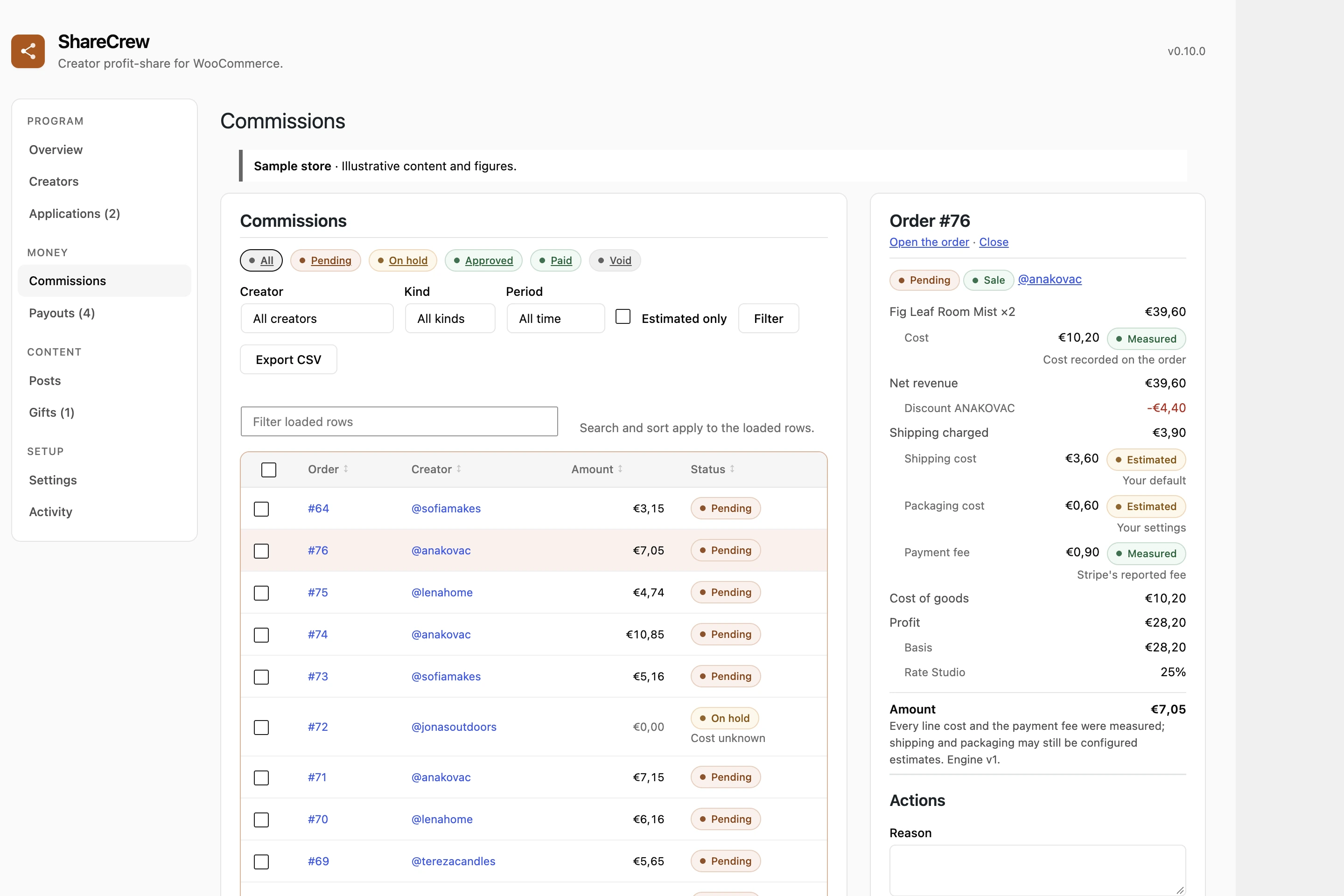
A worked order: €3.76 recorded commission
The three products originally total €45.87 excluding tax. WooCommerce records a €4.59 discount and €41.28 of line revenue after that discount. The customer pays no shipping charge; the merchant still records a shipping cost. Use the saved order totals rather than recalculating a nominal coupon percentage.
| Input | Amount | Evidence or meaning |
|---|---|---|
| Product A revenue / cost | €4.46 / €1.78 | Post-discount revenue / frozen order-item cost |
| Product B revenue / cost | €16.16 / €7.72 | Post-discount revenue / frozen order-item cost |
| Product C revenue / cost | €20.66 / €9.64 | Post-discount revenue / frozen order-item cost |
| Total line revenue | €41.28 | The €4.59 discount is already included |
| Product costs | −€19.14 | Sum of the three recorded costs |
| Merchant shipping cost | −€6.89 | Configured shipping-table estimate |
| Packaging | −€0.90 | Configured €0.30 per item × 3 |
| Payment fee | −€0.87 | Recorded Stripe fee on the order |
| Other recorded cost | −€0.95 | A synthetic sample gift supplied by a store cost filter |
| Recorded profit basis | €12.53 | €41.28 − €19.14 − €6.89 − €0.90 − €0.87 − €0.95 |
| Creator commission | €3.76 | €12.53 × 30% = €3.759, rounded to cents |
ShareCrew applies rates using integer minor units and round-half-up arithmetic: 1,253 cents × 3,000 basis points ÷ 10,000 = 375.9 cents, rounded to 376 cents. The example's separate 20%-of-revenue cap is €8.26, so it does not reduce the €3.76 share. Different settings can change the result. This recorded basis includes the selected costs; it is not a complete business-profit or cash-flow statement.
What a refund changes
Now return Product B in full. The remaining post-discount line revenue is €25.12 and the remaining product cost is €11.42. In this fixture the original shipping, packaging, payment fee and sample-gift costs remain: €25.12 − €11.42 − €6.89 − €0.90 − €0.87 − €0.95 = €4.09. At 30%, the revised commission is €1.23.
The refund's €19.72 customer amount includes the product's €3.56 tax, while the profit-basis calculation removes its €16.16 line revenue excluding tax. An amount-only refund has a different calculation because it names no returned line. ShareCrew records an adjustment or clawback according to the saved commission's state; it preserves the original financial row. A clawback record does not reverse a bank or PayPal transfer. See commission and refund behavior before processing a real refund.
What happens when a cost is missing?
With the default unknown-cost policy, a product whose cost cannot be resolved puts the commission on hold. An unresolved cost is not a measured zero: the displayed zero commission in that held state is not an approved zero-cost calculation. Review the configured source order, product or variation metadata and any margin assumptions in Settings → Costs.
An explicitly entered zero can be a genuine measured cost. A margin fallback is an assumption, not proof of the product's unit cost. Product edits affect later reads; existing order snapshots retain their recorded inputs. Repairing a product field alone does not recalculate old commissions or release a hold. Review the order's saved breakdown and use the documented explicit recovery procedure when appropriate.
From recorded commission to a real payout
- Recorded: a commission row explains the attributed order, basis, rate and amount.
- Pending or held: maturity rules or an unresolved issue can keep that amount unavailable.
- Approved balance: eligible recorded rows can enter a payout run, subject to the store's rules and currency.
- Payout file and marked-paid record: a CSV or statement supports the merchant's payment workflow. A person sends or authorizes an external transfer; marking a record paid does not prove settlement.
Review your first order against its saved inputs, then follow the payout documentation. Statements record the store's chosen text and payment reference; they do not calculate, withhold or file tax.
Try the calculation on your own store
Get the released free plugin, follow the setup steps, and check one attributed order's breakdown before preparing payout files. Start with readable product costs and a deliberate rate. Optional Pro product requests are independent of these core financial workflows.