Author and technical review: WP Shelf. Manual save and generated-run review/apply/undo checked in a fresh local shop with the publicly downloadable SnippetGrove Free 0.67.0 on 13 November 2026. The products are invented and the review suggestions are hand-authored fixtures; no AI service or payment was used. Host storage verification dates are listed below. No sales or search-performance result is implied by this example.
Start with one product, not the whole shop. The goal is to establish that the description is accurate, saved in the right place and visible on the page before repeating the work. SnippetGrove's free local audit and manual editor can handle the missing-field path without an account. You can also make the edits in your existing SEO plugin's product editor.
The three-product example · Where the description lives · Manual fix · Optional AI · Verify and undo · Reusable checklist
1. Separate missing fields from repeated output
This invented catalogue has three published product pages. The source facts are deliberately modest; they do not establish shipping, returns, safety certifications or performance claims.
| Product and verified facts | Current description | Next action |
|---|---|---|
| White porcelain mug 200 ml; white; porcelain | Stored description is empty. | Check the rendered tag, then write a product-specific description. |
| Black stoneware mug 300 ml; black; stoneware | “Shop our collection. Discover quality products for every day.” | Compare the rendered output with the bottle below. Replace generic wording in the SEO host editor. |
| Steel bottle 500 ml; stainless steel; screw cap | The same collection sentence as the black mug. | Write from the bottle's own facts. Do not add an unverified insulation or leakproof claim. |
In WP Shelf → SnippetGrove → Coverage, inspect the product post type and the meta-description field. Follow the missing count to Missing metadata. The released audit measures stored-field coverage; it does not identify every nonempty duplicate or judge whether the wording is persuasive.
For repeated wording, export your product pages' rendered descriptions with a crawler you already use, then paste the descriptions into the free bulk checker. It compares the pasted set in your browser; it does not crawl your shop or write anything back. Keep a separate URL-to-description list so you can find the affected products again. A duplicate finding needs a human check: two genuinely equivalent pages can require a different site-structure decision.
2. Check the SEO host before changing values
The SEO plugin already on the shop still owns its templates, sitemaps and redirects. SnippetGrove writes supported fields through that host; it does not replace the host's wider configuration. If two SEO plugins are active, resolve which one owns the output before making a batch of changes.
| Host in the verified matrix | Stored description | What to check on the page |
|---|---|---|
| Yoast SEO 28.5 | Post meta: _yoast_wpseo_metadesc | Yoast also uses indexables for frontend output. A raw database edit can leave an old rendered value; use the supported editor/write path and verify a new request. |
| Rank Math 1.0.278 | Post meta: rank_math_description | Check the finished setup and rendered result, including any configured fallback. A blank stored value alone does not prove an empty tag. |
| All in One SEO 5.0.1.1 | The description column in its own aioseo_posts table, through its Post model | Do not treat legacy-looking post-meta keys as the authoritative current record. Inspect the host editor and a separate frontend request. |
| SEOPress 10.2 | Post meta: _seopress_titles_desc | Compare the per-product value with the rendered description after template variables and applicable fallbacks are resolved. |
These are dated verified versions, not a claim that every later host release has been retested. This guide's three-product description example also passed on 13 November with Yoast 28.8, WordPress 7.1.2 and WooCommerce 11.3.0; the other hosts were not rerun for this guide. The SEO field reference lists all six verified post fields, editions and caveats. Database prefixes vary; this table is a diagnostic reference, not an instruction to run SQL on your shop.
An empty stored field may still produce a description through a host's template or excerpt fallback. If that output is accurate and distinctive, you may choose to keep it. If every product renders the same generic sentence, repair the template or write explicit product values. For the Yoast-specific stale-output case, use the indexables troubleshooting guide.
3. Fix the first missing description for free
- Record the starting point. Save the product URL, current stored value and current rendered tag in a local repair log. Take a normal site backup before wider changes.
- Confirm the facts. Open the white mug's product page and verify material, colour and capacity. If a fact is absent or uncertain, leave it out.
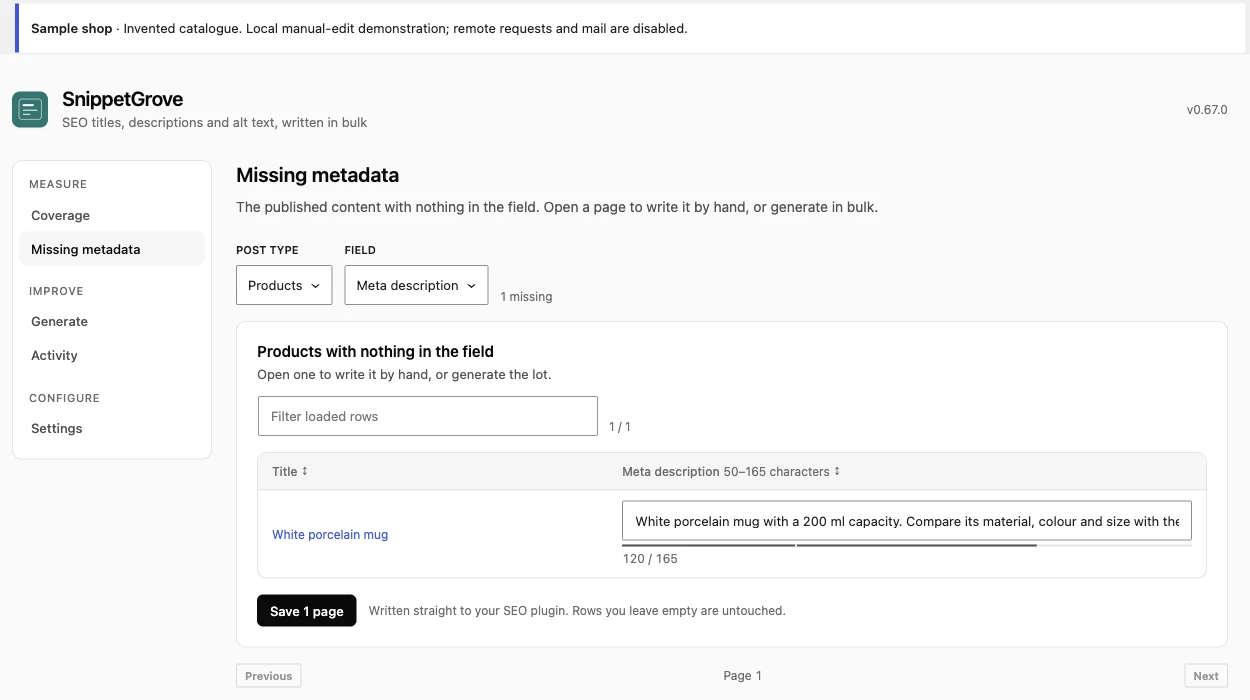
- Write one useful sentence. For this example: “White porcelain mug with a 200 ml capacity. Compare its material, colour and size with the other mugs in the collection.” This is illustrative wording, not a search-performance benchmark.
- Save the missing field. In Missing metadata, select the product type and description field, type the wording into the matching row, then choose Save 1 page. This writes directly to the SEO host; it does not create an AI review run. Empty rows are left alone. Confirm the save result before leaving.
- Open the actual product URL. Inspect its rendered
<meta name="description">in page source or browser developer tools. Check the value, not just the editor's preview. Deal with any page/CDN cache before concluding that a write failed.
For the black mug and steel bottle, the description is already populated, so the missing-field editor is not the replacement workflow. Open each product's normal SEO host editor, retain the old value in your repair log, and save new wording there. For example: “Black stoneware mug with a 300 ml capacity. Check the material, colour and size before choosing a mug for your table.” The bottle can describe its 500 ml capacity, stainless steel and screw cap without promising insulation or a leakproof seal.
4. Choose AI only when it helps this batch
You can complete the example manually. If you choose hosted generation, first connect a SnippetGrove licence in Settings. A verified customer can receive 25 free hosted items once for SnippetGrove, on one site; additional generation uses the one-time item packs. One item is one field on one product or post: three descriptions are three items, and adding three SEO titles makes six.
Use a small Generate run for products and the description field. The missing-only option is the default; the alternative that replaces written fields requires an explicit choice and confirmation. Check the planned selection and item count before starting. An item limit caps work; it is not proof that the planner selected the three URLs in this example.
Items are consumed when wording is generated, before Apply. Discarding a successful suggestion, undoing a write or generating another version does not refund the first generation. Avoid starting another run just to recover a run whose status temporarily failed to load.
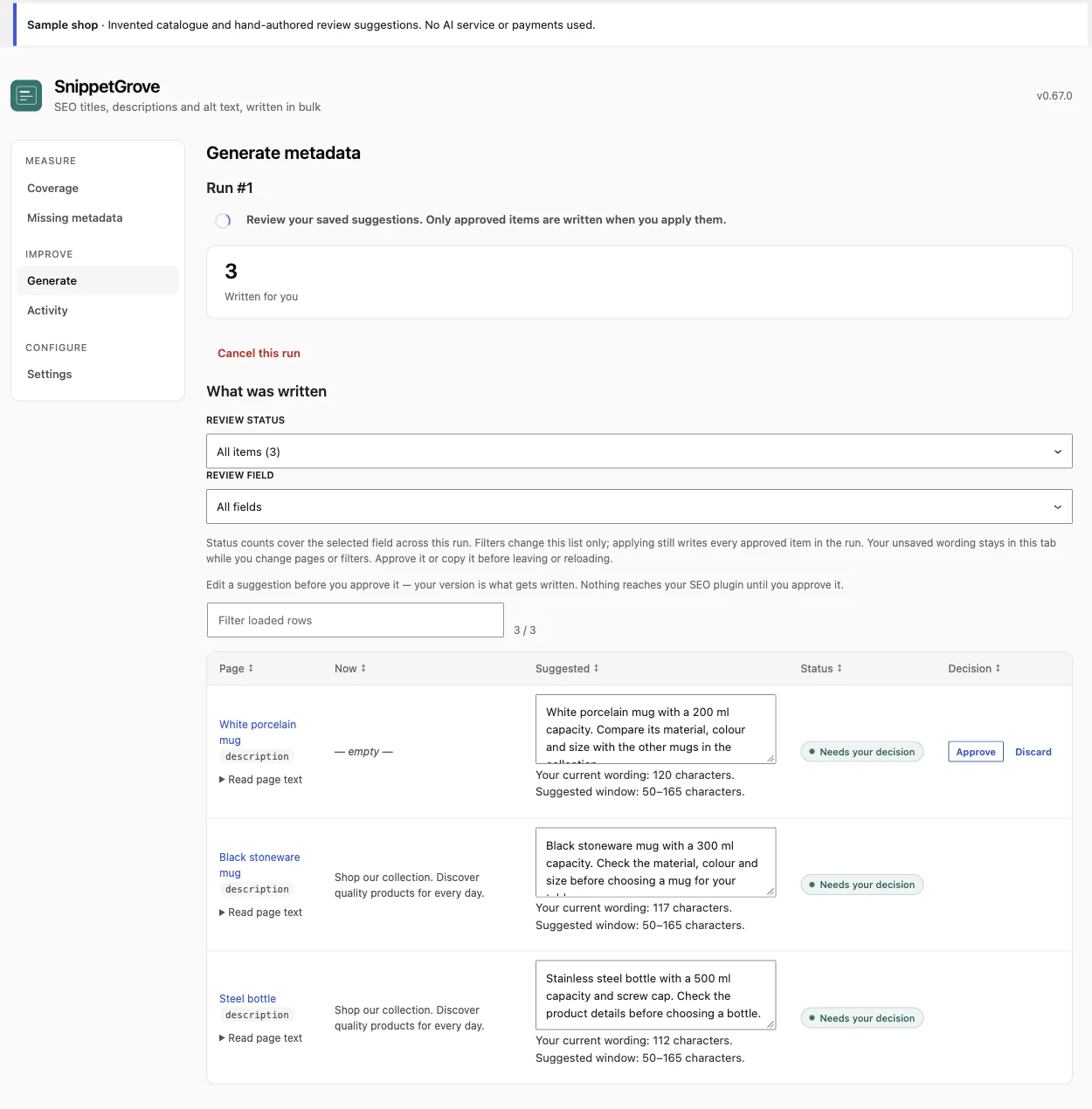
- Open the run's review queue and compare each suggestion with the product facts and current saved wording.
- Edit unsupported claims or discard the suggestion. A plausible shipping, warranty or material statement is still wrong if the product record does not establish it.
- Choose Approve for each acceptable suggestion. There is no approve-all action. Save an edited draft by approving it, or copy it before leaving the page.
- Review the run's approved total, then choose Apply. Apply writes the approved items in that run; narrowing a review filter does not narrow the write to the visible rows.
Optional SnippetGrove Pro adds saved catalogue rules, field/review profiles and generate-on-publish automation. It is not required for this manual repair or a manually started generation run, includes no AI items, and does not remove review before generated fields are applied. Follow the full generation and recovery instructions for the installed version.
5. Verify the page, then test recovery
After a confirmed save or Apply, inspect each selected product in a new frontend request. Check for one intended description tag, accurate resolved wording and no unchanged generic template overriding it. If you expected a title change too, inspect the actual <title>. A snippet preview is an estimate of presentation, not proof of the HTML your shop serves.
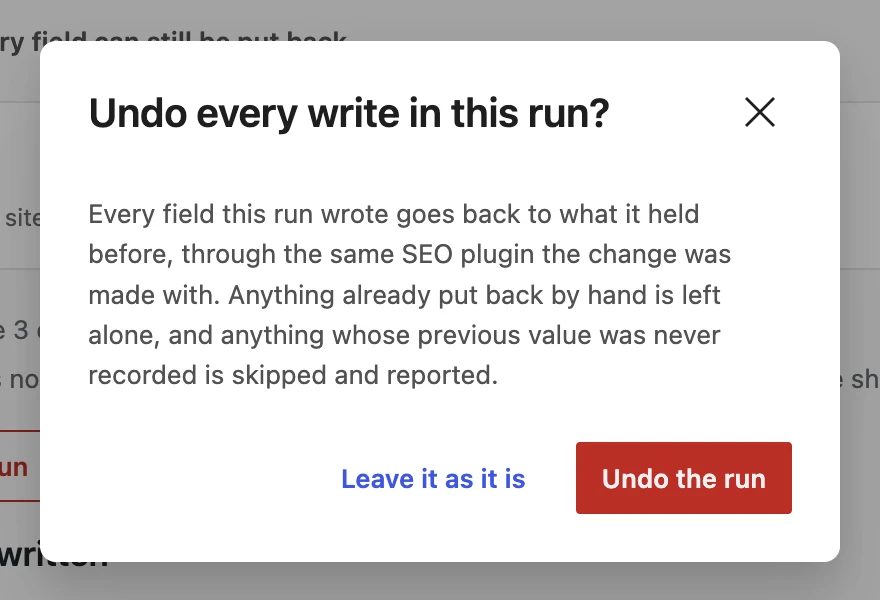
For an applied generation run, use Activity to review the recorded field, previous value and result. Use an entry's undo control for that journalled field, or Undo this run for the run. Read the restored/skipped counts and check the frontend again. Undo preserves later changes rather than blindly replacing them; a newer SnippetGrove write to that field must be undone first. The journal is retained for 90 days by default, so retain your own change log and backup for longer recovery needs.
The released Missing metadata manual Save is not added to this journal. Neither are edits made directly in another SEO plugin. Restore a manual change in the host's normal editor using the previous value you retained; for the white mug, the previous explicit description was empty. Check the rendered page again after restoring it. After one successful repair and recovery check, expand to a manageable batch and repeat the same verification.
Google builds snippets primarily from page content and may use the description when it is a better summary. The wording can differ by query and device. There is no fixed published description-length limit: the SERP preview and bulk checker's budgets are estimates. Use Search Console over a meaningful period to assess results; a corrected tag alone establishes neither ranking nor conversion lift.
Keep a checklist for the next batch
Download the reusable repair checklist (plain text). Copy one section per batch into your own repair log. Keep customer information and private shop URLs out of shared examples.
- Choose the URLs and record the active SEO host/version.
- Separate empty stored fields from missing or repeated rendered output.
- Retain old values and verify each product fact.
- Choose manual Save or an explicit, counted generation run.
- Review each suggestion and the approved total before Apply.
- Check the actual tags in a fresh request, including caches and templates.
- Record the result and test recovery before expanding the batch.
New to the plugin? Run your first free audit. Planning a larger catalogue process? The description-at-scale guide covers prioritisation and templating beyond this small repair example.